React Native FlatList

The FlatList component displays the similar structured data in a scrollable list. It works well for large lists of data where the number of list items might change over time. The FlatList shows only those renders elements which are currently displaying on the screen, not all the elements of the list at once.
The FlatList component takes two required props: data and renderItem.
The data is the source of elements for the list, and renderItem takes one item from the source and returns a formatted component to render.

To implement the FlatList component, we need to import FlatList from 'react-native' library.

React Native FlatList Example

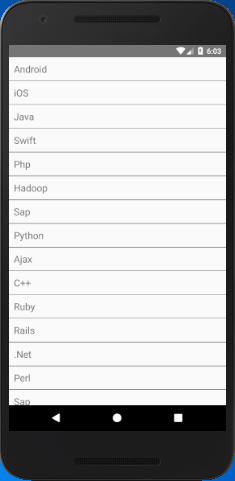
In this example, we provide hardcoded elements to data prop. Each element in the data props is rendered as a Text component.
The ItemSeparatorComponent prop of FlatList is used to implement the separator between the elements of the list. To perform the click event on list items, we use onPress prop to Text.

  1. import React, { Component } from 'react';  
  2. import { AppRegistry, FlatList,  
  3.     StyleSheet, Text, View,Alert } from 'react-native';  
  4.   
  5. export default class FlatListBasics extends Component {  
  6.   
  7.     renderSeparator = () => {  
  8.         return (  
  9.             <View  
  10.                 style={{  
  11.                     height: 1,  
  12.                     width: "100%",  
  13.                     backgroundColor: "#000",  
  14.                 }}  
  15.             />  
  16.         );  
  17.     };  
  18.     //handling onPress action  
  19.     getListViewItem = (item) => {  
  20.         Alert.alert(item.key);  
  21.     }  
  22.   
  23.     render() {  
  24.         return (  
  25.             <View style={styles.container}>  
  26.                 <FlatList  
  27.                     data={[  
  28.                         {key: 'Android'},{key: 'iOS'}, {key: 'Java'},{key: 'Swift'},  
  29.                         {key: 'Php'},{key: 'Hadoop'},{key: 'Sap'},  
  30.                         {key: 'Python'},{key: 'Ajax'}, {key: 'C++'},  
  31.                         {key: 'Ruby'},{key: 'Rails'},{key: '.Net'},  
  32.                         {key: 'Perl'},{key: 'Sap'},{key: 'Python'},  
  33.                         {key: 'Ajax'}, {key: 'C++'},{key: 'Ruby'},  
  34.                         {key: 'Rails'},{key: '.Net'},{key: 'Perl'}  
  35.                     ]}  
  36.                     renderItem={({item}) =>  
  37.                         <Text style={styles.item}  
  38.                               onPress={this.getListViewItem.bind(this, item)}>{item.key}</Text>}  
  39.                     ItemSeparatorComponent={this.renderSeparator}  
  40.                 />  
  41.             </View>  
  42.         );  
  43.     }  
  44. }  
  45.   
  46. const styles = StyleSheet.create({  
  47.     container: {  
  48.         flex: 1,  
  49.     },  
  50.     item: {  
  51.         padding: 10,  
  52.         fontSize: 18,  
  53.         height: 44,  
  54.     },  
  55. })  
  56.   
  57.   
  58. AppRegistry.registerComponent('AwesomeProject', () => FlatListBasics);  

Output:
React Native FlatList React Native FlatList

Comments

Popular Posts

Reloading UITableView while Animating Scroll in iOS 11

Reloading UITableView while Animating Scroll Calling  reloadData  on  UITableView  may not be the most efficient way to update your cells, but sometimes it’s easier to ensure the data you are storing is in sync with what your  UITableView  is showing. In iOS 10  reloadData  could be called at any time and it would not affect the scrolling UI of  UITableView . However, in iOS 11 calling  reloadData  while your  UITableView  is animating scrolling causes the  UITableView  to stop its scroll animation and not complete. We noticed this is only true for scroll animations triggered via one of the  UITableView  methods (such as  scrollToRow(at:at:animated:) ) and not for scroll animations caused by user interaction. This can be an issue when server responses trigger a  reloadData  call since they can happen at any moment, possibly when scroll animation is occurring. Example of s...

What are the Alternatives of device UDID in iOS? - iOS7 / iOS 6 / iOS 5 – Get Device Unique Identifier UDID

Get Device Unique Identifier UDID Following code will help you to get the unique-device-identifier known as UDID. No matter what iOS user is using, you can get the UDID of the current iOS device by following code. - ( NSString *)UDID { NSString *uuidString = nil ; // get os version NSUInteger currentOSVersion = [[[[[UIDevice currentDevice ] systemVersion ] componentsSeparatedByString: @" . " ] objectAtIndex: 0 ] integerValue ]; if (currentOSVersion <= 5 ) { if ([[ NSUserDefaults standardUserDefaults ] valueForKey: @" udid " ]) { uuidString = [[ NSUserDefaults standardDefaults ] valueForKey: @" udid " ]; } else { CFUUIDRef uuidRef = CFUUIDCreate ( kCFAllocatorDefault ); uuidString = ( NSString *) CFBridgingRelease ( CFUUIDCreateString ( NULL ,uuidRef)); CFRelease (uuidRef); [[ NSUserDefaults standardUserDefaults ] setObject: uuidString ForKey: @" udid " ]; [[ NSUserDefaults standardUserDefaults ] synchro...

Xcode & Instruments: Measuring Launch time, CPU Usage, Memory Leaks, Energy Impact and Frame Rate

When you’re developing applications for modern mobile devices, it’s vital that you consider the performance footprint that it has on older devices and in less than ideal network conditions. Fortunately Apple provides several powerful tools that enable Engineers to measure, investigate and understand the different performance characteristics of an application running on an iOS device. Recently I spent some time with these tools working to better understand the performance characteristics of an eCommerce application and finding ways that we can optimise the experience for our users. We realised that applications that are increasingly performance intensive, consume excessive amounts of memory, drain battery life and feel uncomfortably slow are less likely to retain users. With the release of iOS 12.0 it’s easier than ever for users to find applications that are consuming the most of their device’s finite amount of resources. Users can now make informed decisions abou...